UI / UX Design
Patient-Centered Hospital Sleep System for Rest and Recovery
An omni-channel sleep support system that helps post-surgery patients feel informed and in control by reducing uncertainty and creating a calmer, more predictable recovery experience.
Year :
2025
Client :
University Project
Project Duration :
Aug - Nov
My Role :
UX/UI Designer

Why This Matters?
“I always felt anxious and didn’t know what was going on around me.”
Patients recovering from surgery sleep almost two hours less in hospitals than they do at home. Our research found that the biggest disruptor isn’t noise or light, it’s the uncertainty and loss of control patients feel in an unfamiliar environment.
Not knowing when check-ups will happen, what’s coming next, or whether a disturbance is urgent makes it difficult to relax, leading to poorer sleep and slower recovery.

Overview
The Challenge
Hospitals are overwhelming and unpredictable for patients, especially after surgery. Existing hospital systems improve communication, but none address the emotional stress and uncertainty that directly impact sleep and healing.
The Solution
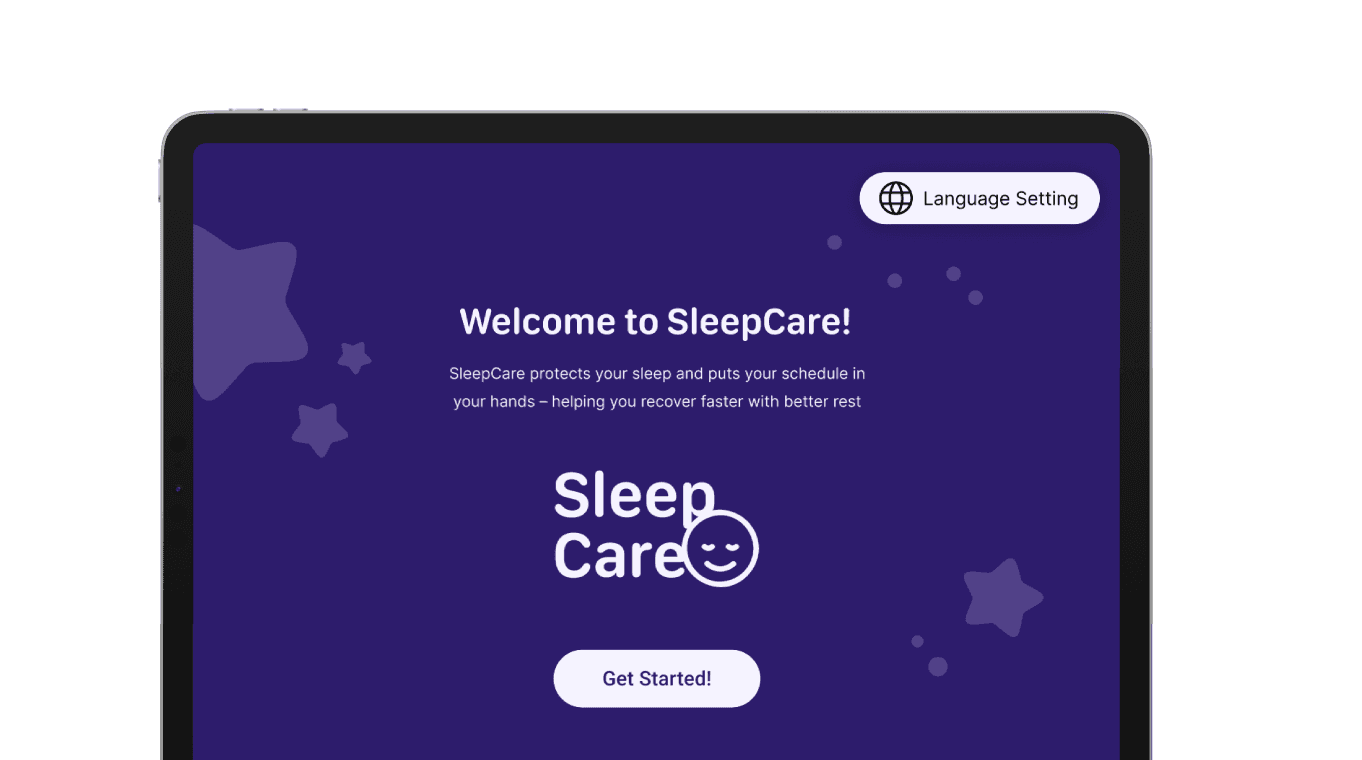
SleepCare is an omni-channel hospital system combining a connected wristband and bedside display that helps post-surgery patients feel informed and in control. By providing clear routines, gentle cues, and personalised quiet hours, SleepCare reduces anxiety and supports a calmer recovery experience.
My Role & Contributions
Led user interviews, and supported surveys and online ethnography
Synthesised insights through affinity diagramming
Defined the problem statement and HMW question
Co-led concept development and ideation workshops (Crazy 8s, SCAMPER)
Designed interaction flows and high-fidelity screens in Figma
Iterated dashboard layout, information hierarchy, and wristband UX
Conducted user testing and refined UI based on feedback
Key Insights
“I would need someone to grab the water for me.”
“It would be nice to know how long I had till the next checkup.”
“Staying up multiple days in a row can kill people.”
"It was a very, very light sleep the whole night.”
Patients raised several points, which led to the following…
3 Insights
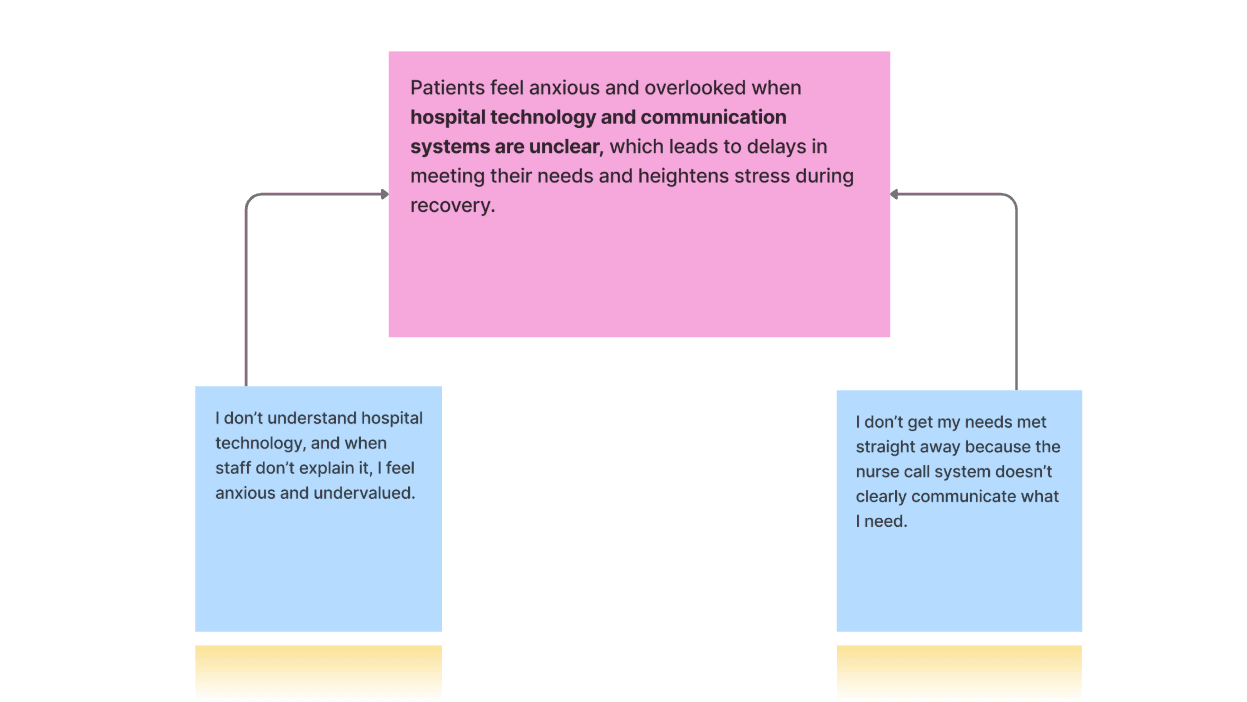
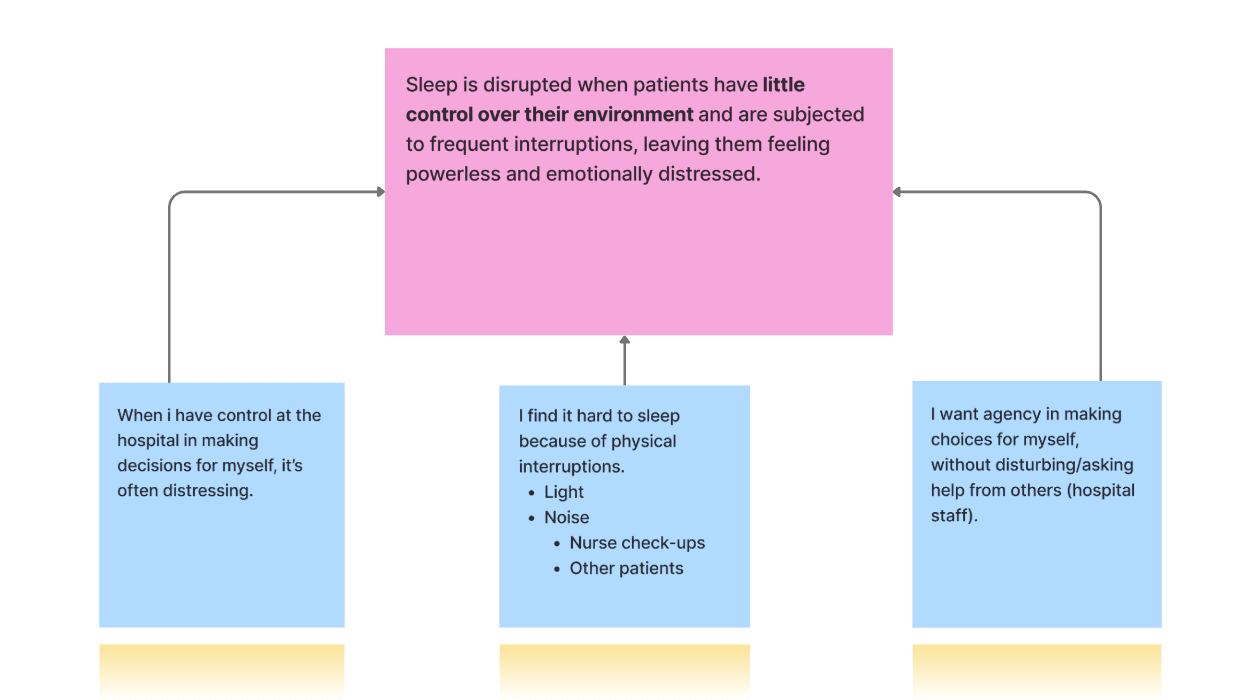
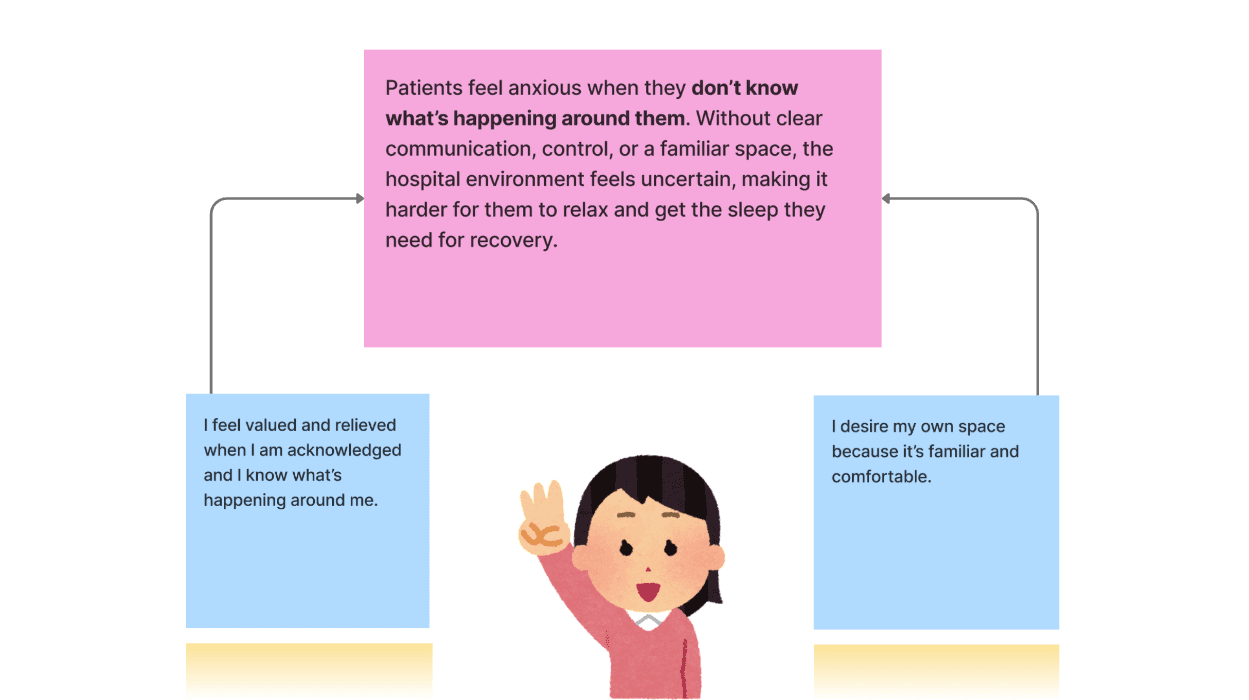
Using an affinity diagram, I led the synthesis of raw data, grouping them into themes and then insights.
Insight 1
Insight 2
Insight 3
Eventually, these key insights led to a single defined…
Problem Statement
Post-surgery patients often get less sleep than the recommended 7–9 hours, which slows their recovery. Poor sleep is caused by unclear communication about schedules and check-ups, and the loss of control patients feel in an unfamiliar environment, leaving them anxious and unable to rest.
So…
How Might We…
help post-surgery patients stay informed by delivering clear communication and certainty, giving them a greater sense of control and helping them sleep better for rest and recovery?
Competitor Insights - Finding the Gap in the Market
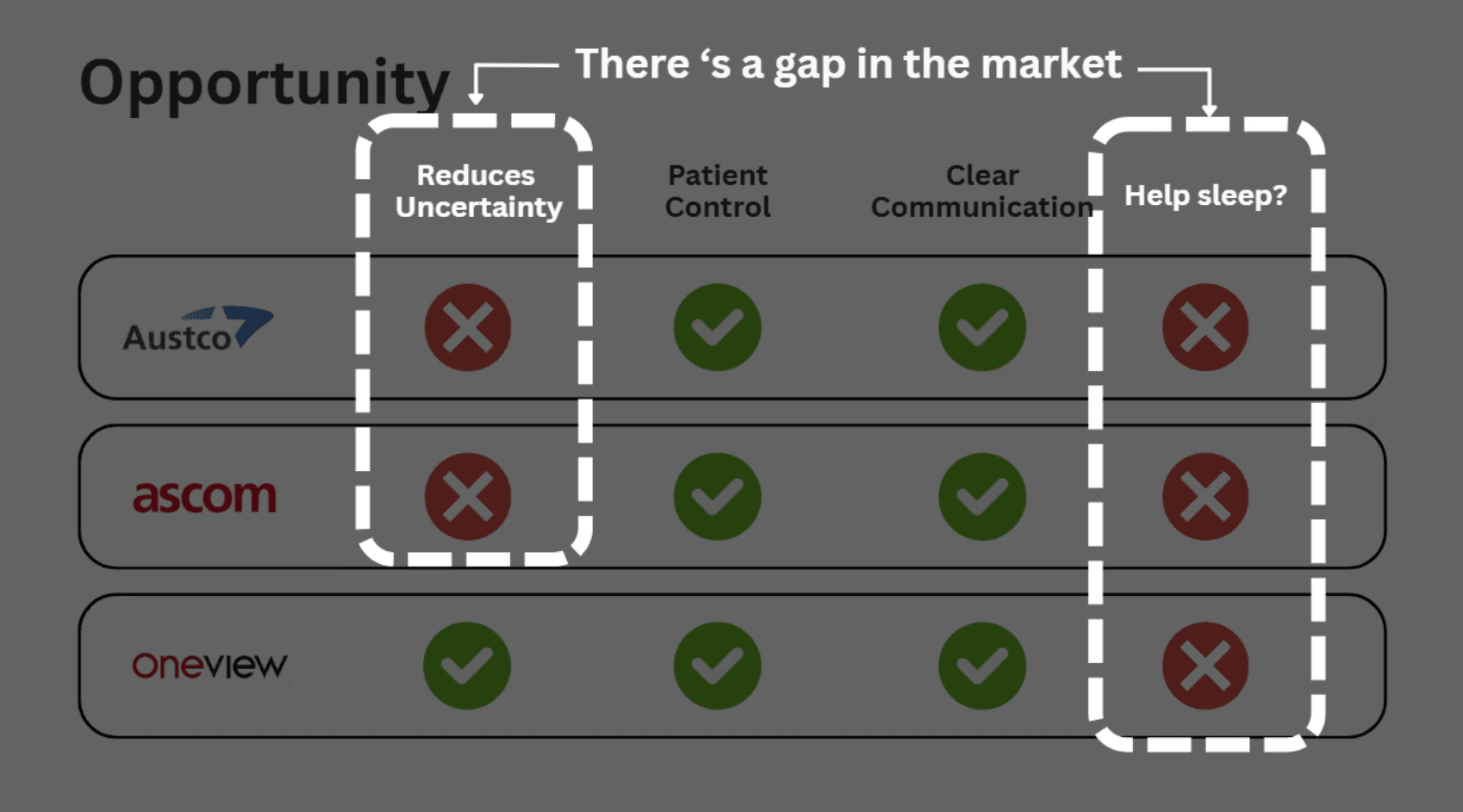
We examined leading hospital communication systems:
Existing hospital communication systems focus on patient control and clear nurse–patient communication, but none of them reduce the uncertainty that causes anxiety, and none are designed to improve patient sleep.
Austco and Ascom provide responsive nurse call technologies, while Oneview enhances patient engagement, but all three leave a critical gap untouched:
Helping patients feel calm, informed, and able to rest.
Design Opportunity:
There is a clear market gap for a system that reduces uncertainty and actively supports sleep by making hospital routines predictable, understandable, and less disruptive for recovering patients.
Ideation (Concept Development)
We explored multiple directions based on patient needs:
Environmental control concepts (curtains, sound dampening, bed adjustments)
Smart room or voice-controlled environments
Smart bed + sleep-stage–aware interventions
Kiosk-style request systems
Through Crazy 8s and SCAMPER ideation strategies, we identified that the root problem was uncertainty, NOT just the physical environment.
This led to the core concept:
A clear, predictable, omni-channel system that keeps patients informed and in control.
The wristband adds accessible reminders and sleep tracking.
The bedside display offers clarity, not clutter.
Together, they restore calm, predictability, and patient agency.
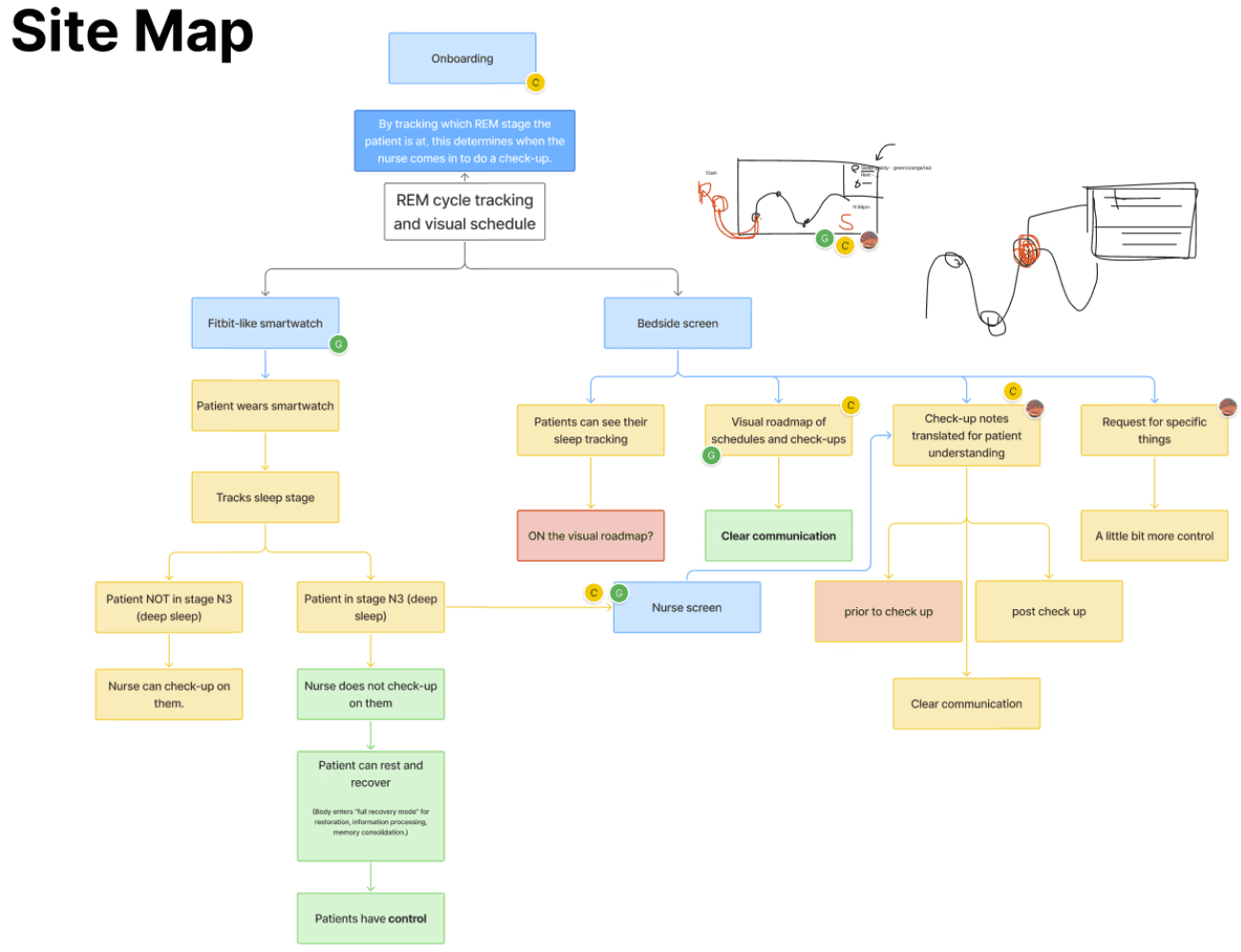
This was mapped out onto a site map to visually show user navigation through the two different channels.
Concept Wireframing and Iterations
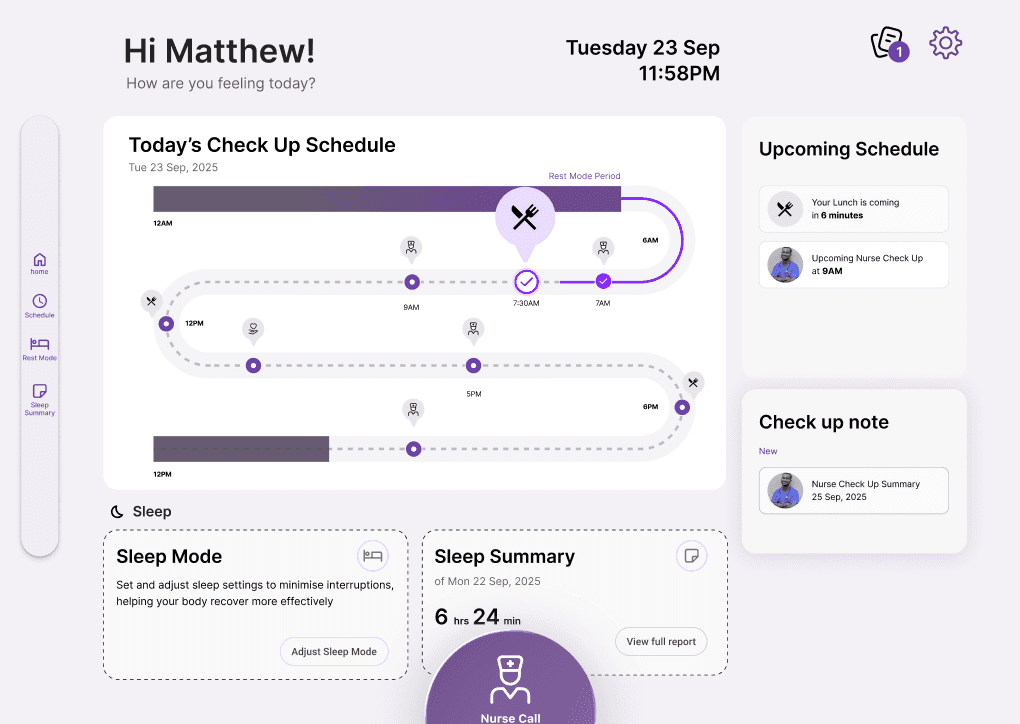
The initial iterations of our low-fidelity wireframes looked like this, inspired by the metaphor of a patient's "road to recovery".
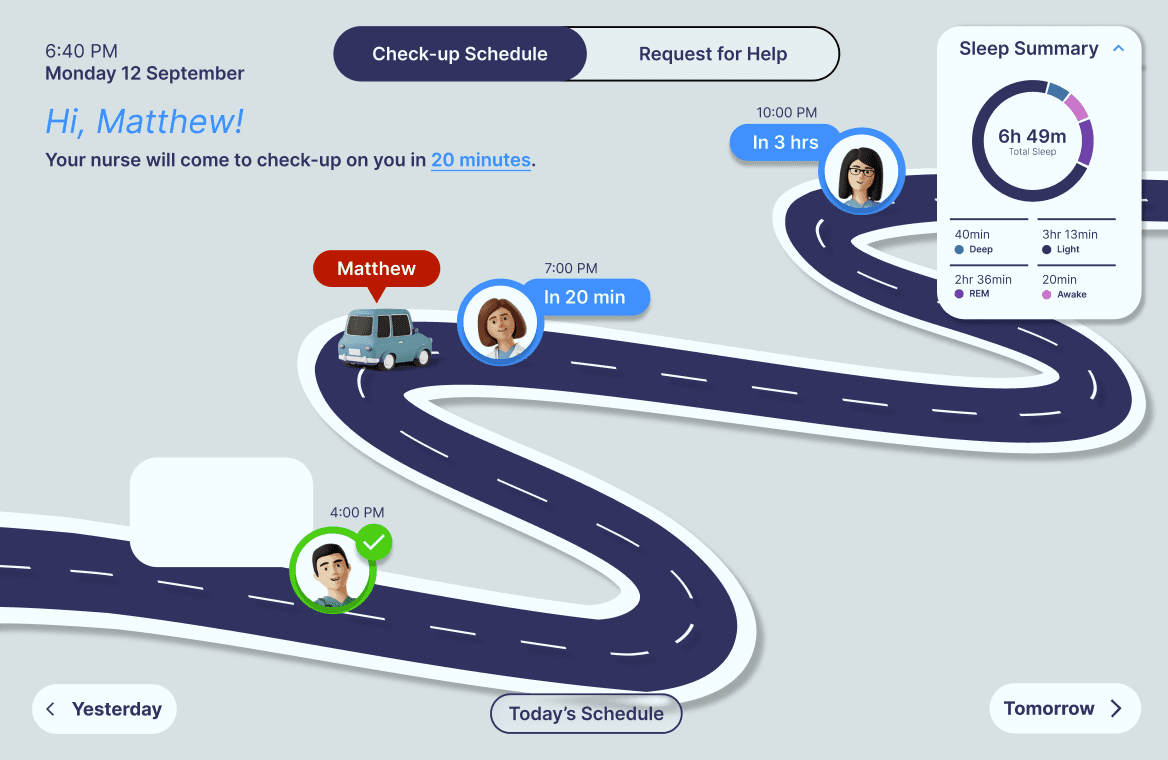
Then it transformed into a simpler interface that felt more modern and with the times, containing widget-like features around the main visual schedule…
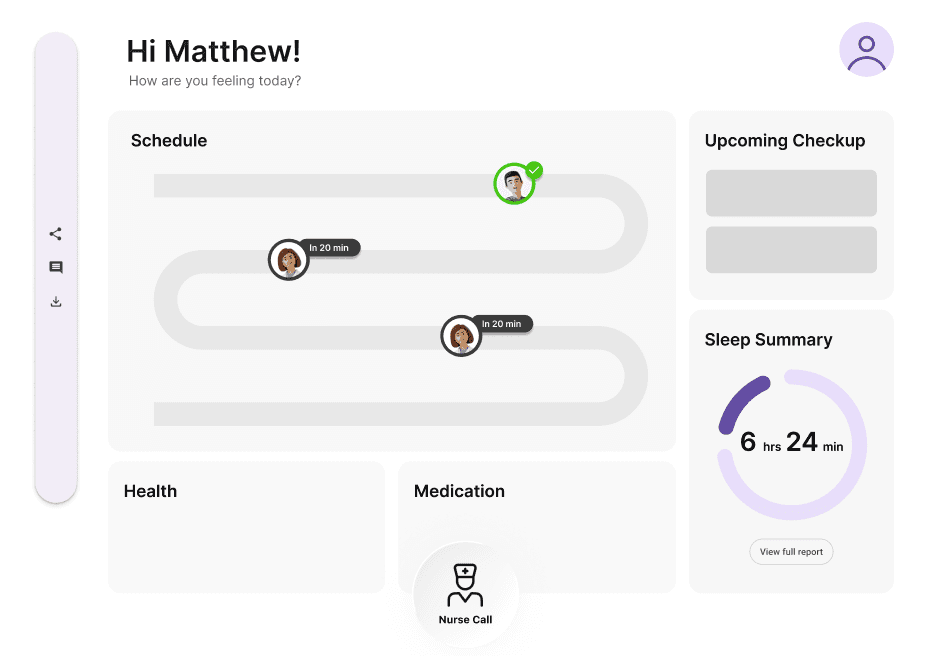
This evolved into…
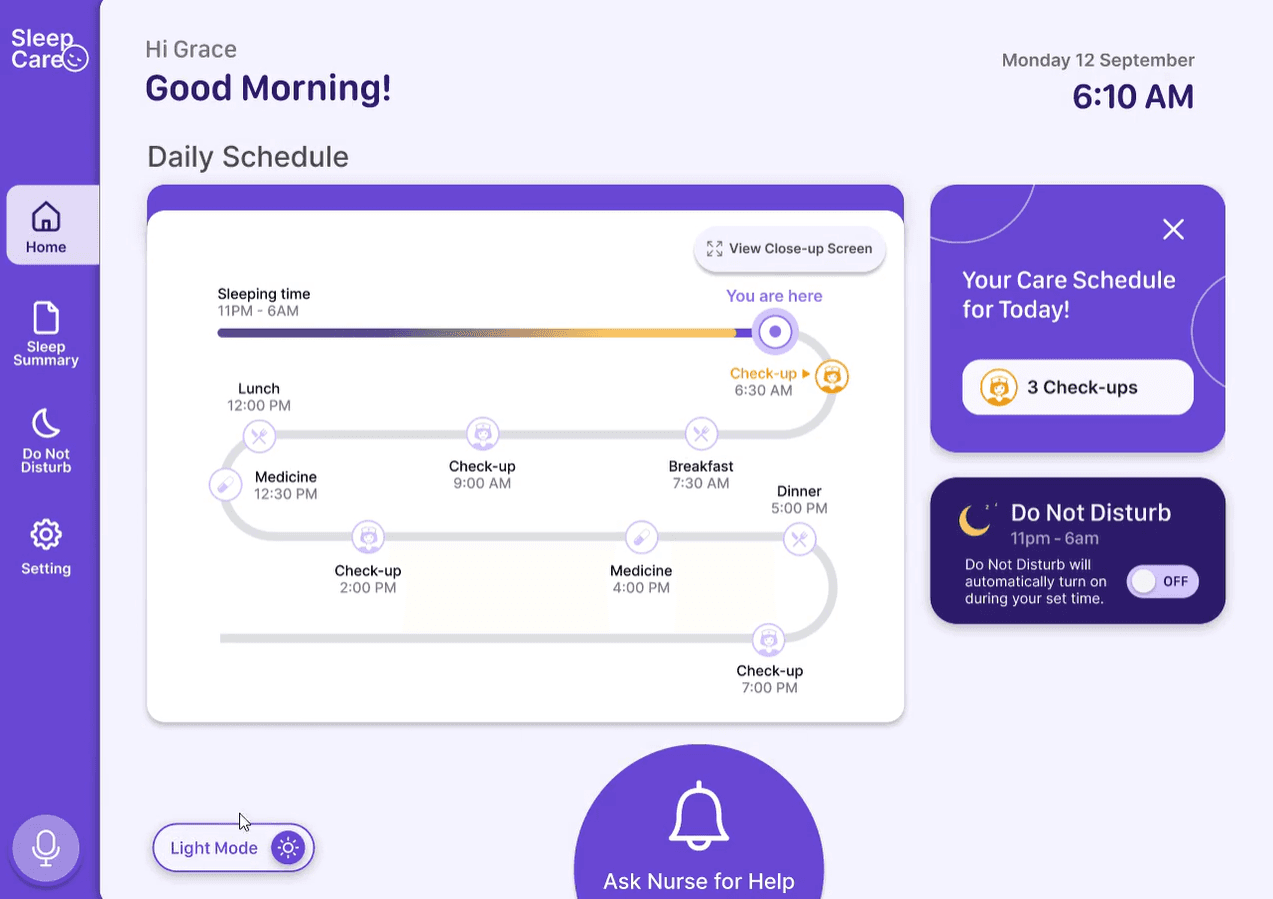
And finally evolving into the final design after many, many iterations…
Final Solution: The SleepCare System
SleepCare is a connected wristband and bedside display designed to help post-surgery patients feel informed, in control, and able to rest.
Each touchpoint plays a specific role in reducing uncertainty, supporting sleep, and improving the patient experience.
Onboarding - Connecting the Wristband
Step-by-step guidance to pair the wristband with the bedside display via Bluetooth.
Clear instructions and confirmation messages to help patients feel confident using the system.
Designed for low cognitive load so patients can quickly understand how SleepCare works.

Main Dashboard - Clear Daily Schedule
A glanceable visual roadmap showing upcoming check-ups, meals, and medication times.
Prioritised information hierarchy so patients instantly know what’s happening next.
Vibrating reminders appear on both wristband and display to gently prepare patients for upcoming events.
“View Close-Up” mode lets patients zoom into key details for accessibility.
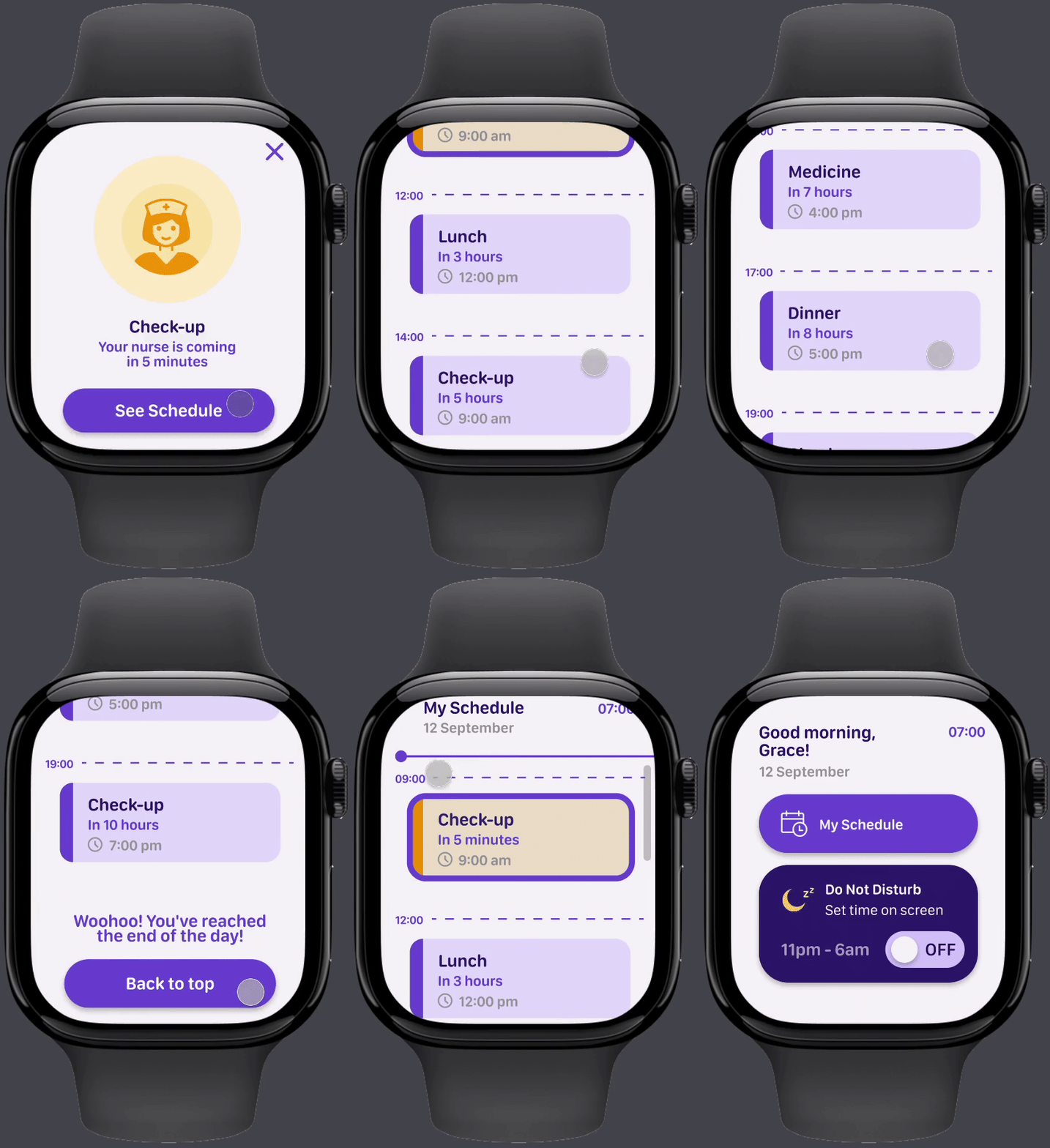
Do Not Disturb Mode - Personalised Uninterrupted Sleep
Patients choose their preferred uninterrupted sleep window based on their risk level.
The system postpones non-urgent check-ups during deep/REM sleep to avoid waking patients.
Night-mode UI reduces visual brightness and supports a calmer sleep environment.
Confirmation screens ensure patients understand the changes they’ve set.
Sleep Summary - Reflecting on Rest
A simple graph showing light, deep, and REM sleep stages from the previous night.
Helps patients understand their recovery patterns without overwhelming them.
Designed as a “nice to have” rather than a primary feature, based on user feedback.
Ask Nurse for Help - Clear, Simple Request System
Three request types: General Help, Specific Item, or Emergency.
Item request flow reduces ambiguity so nurses know exactly what patients need.
Optional text entry so patients can request items not listed.
Supports smoother nurse workflows and reduces unnecessary stress for patients.
How Each Screen Supports the Goal
Onboarding → reduces confusion
Main Dashboard → reduces uncertainty
Do Not Disturb → enables uninterrupted sleep
Sleep Summary → builds awareness
Nurse Requests → improves communication and emotional safety
Together, these features form a system that clearly communicates post-surgery patient schedules and checkups, giving them a greater sense of control, and ultimately, reducing anxiety and stress in hospitals, leading to better rest and recovery.
Final Solution: The SleepCare System
SleepCare is a connected wristband and bedside display designed to help post-surgery patients feel informed, in control, and able to rest.
Each touchpoint plays a specific role in reducing uncertainty, supporting sleep, and improving the patient experience.
Onboarding - Connecting the Wristband
Step-by-step guidance to pair the wristband with the bedside display via Bluetooth.
Clear instructions and confirmation messages to help patients feel confident using the system.
Designed for low cognitive load so patients can quickly understand how SleepCare works.
Main Dashboard - Clear Daily Schedule
A glanceable visual roadmap showing upcoming check-ups, meals, and medication times.
Prioritised information hierarchy so patients instantly know what’s happening next.
Vibrating reminders appear on both wristband and display to gently prepare patients for upcoming events.
“View Close-Up” mode lets patients zoom into key details for accessibility.
Do Not Disturb Mode - Personalised Uninterrupted Sleep
Patients choose their preferred uninterrupted sleep window based on their risk level.
The system postpones non-urgent check-ups during deep/REM sleep to avoid waking patients.
Night-mode UI reduces visual brightness and supports a calmer sleep environment.
Confirmation screens ensure patients understand the changes they’ve set.
Sleep Summary - Reflecting on Rest
A simple graph showing light, deep, and REM sleep stages from the previous night.
Helps patients understand their recovery patterns without overwhelming them.
Designed as a “nice to have” rather than a primary feature, based on user feedback.
Ask Nurse for Help - Clear, Simple Request System
Three request types: General Help, Specific Item, or Emergency.
Item request flow reduces ambiguity so nurses know exactly what patients need.
Optional text entry so patients can request items not listed.
Supports smoother nurse workflows and reduces unnecessary stress for patients.
How Each Screen Supports the Goal
Onboarding → reduces confusion
Main Dashboard → reduces uncertainty
Do Not Disturb → enables uninterrupted sleep
Sleep Summary → builds awareness
Nurse Requests → improves communication and emotional safety
Together, these features form a system that clearly communicates post-surgery patient schedules and checkups, giving them a greater sense of control, and ultimately, reducing anxiety and stress in hospitals, leading to better rest and recovery.
Final Solution: The SleepCare System
SleepCare is a connected wristband and bedside display designed to help post-surgery patients feel informed, in control, and able to rest.
Each touchpoint plays a specific role in reducing uncertainty, supporting sleep, and improving the patient experience.
Onboarding - Connecting the Wristband
Step-by-step guidance to pair the wristband with the bedside display via Bluetooth.
Clear instructions and confirmation messages to help patients feel confident using the system.
Designed for low cognitive load so patients can quickly understand how SleepCare works.
Main Dashboard - Clear Daily Schedule
A glanceable visual roadmap showing upcoming check-ups, meals, and medication times.
Prioritised information hierarchy so patients instantly know what’s happening next.
Vibrating reminders appear on both wristband and display to gently prepare patients for upcoming events.
“View Close-Up” mode lets patients zoom into key details for accessibility.
Do Not Disturb Mode - Personalised Uninterrupted Sleep
Patients choose their preferred uninterrupted sleep window based on their risk level.
The system postpones non-urgent check-ups during deep/REM sleep to avoid waking patients.
Night-mode UI reduces visual brightness and supports a calmer sleep environment.
Confirmation screens ensure patients understand the changes they’ve set.
Sleep Summary - Reflecting on Rest
A simple graph showing light, deep, and REM sleep stages from the previous night.
Helps patients understand their recovery patterns without overwhelming them.
Designed as a “nice to have” rather than a primary feature, based on user feedback.
Ask Nurse for Help - Clear, Simple Request System
Three request types: General Help, Specific Item, or Emergency.
Item request flow reduces ambiguity so nurses know exactly what patients need.
Optional text entry so patients can request items not listed.
Supports smoother nurse workflows and reduces unnecessary stress for patients.
How Each Screen Supports the Goal
Onboarding → reduces confusion
Main Dashboard → reduces uncertainty
Do Not Disturb → enables uninterrupted sleep
Sleep Summary → builds awareness
Nurse Requests → improves communication and emotional safety
Together, these features form a system that clearly communicates post-surgery patient schedules and checkups, giving them a greater sense of control, and ultimately, reducing anxiety and stress in hospitals, leading to better rest and recovery.
Accessibility Considerations
SleepCare was designed for patients who may be tired, medicated, visually impaired, or cognitively overwhelmed.
To ensure the system remained usable in real hospital conditions, we made sure to embed accessibility into every screen:
High-contrast colour palette
All UI colours were tested and passed WCAG contrast standards to ensure readability in both bright and dim hospital lighting.Voice-Over Interaction
A built-in voice-over option enables patients with visual impairments to navigate the bedside display without relying on text.Close-Up View for Key Information
Important schedule details can be expanded for patients with low vision or difficulty processing dense information.Light Mode & Dark Mode
Patients can switch between modes depending on time of day and personal comfort. Night mode reduces glare and supports better sleep.
Together, these considerations ensure SleepCare supports clarity, comfort, and inclusivity for all patients — especially those who may be vulnerable or recovering from surgery.
Key Takeaways
Reflection - What I Learned
This project pushed me to think beyond visual design and focus on emotional safety, clarity, and cognitive load, all crucial in healthcare settings. Synthesising large amounts of research helped me understand how powerful small UX decisions can be when patients are vulnerable and overwhelmed.
Continuously iterating the main schedule dashboard in particular taught me that simplifying information is often harder than adding more, and that clear communication can be just as impactful as any feature.
Next Steps - How I’d Improve It
With more time, I’d conduct usability testing with real patients and clinical staff to validate our assumptions about sleep interruptions, risk levels, and workflow.
I’d also want to explore how this system could integrate seamlessly into existing hospital technologies, and refine our Do Not Disturb logic with medical professionals to ensure it supports both patient autonomy and clinical safety.
Takeaway - What This Means for Me
This project taught me that good healthcare design is less about adding complex functionality and more about reducing anxiety and restoring a sense of control.
It also strengthened my ability to design for vulnerable users, communicate design intent clearly, and make decisions grounded in evidence rather than assumption.
More Projects


UI / UX Design
Patient-Centered Hospital Sleep System for Rest and Recovery
An omni-channel sleep support system that helps post-surgery patients feel informed and in control by reducing uncertainty and creating a calmer, more predictable recovery experience.
Year :
2025
Client :
University Project
Project Duration :
Aug - Nov
My Role :
UX/UI Designer
Why This Matters?
“I always felt anxious and didn’t know what was going on around me.”
Patients recovering from surgery sleep almost two hours less in hospitals than they do at home. Our research found that the biggest disruptor isn’t noise or light, it’s the uncertainty and loss of control patients feel in an unfamiliar environment.
Not knowing when check-ups will happen, what’s coming next, or whether a disturbance is urgent makes it difficult to relax, leading to poorer sleep and slower recovery.
Overview
The Challenge
Hospitals are overwhelming and unpredictable for patients, especially after surgery. Existing hospital systems improve communication, but none address the emotional stress and uncertainty that directly impact sleep and healing.
The Solution
SleepCare is an omni-channel hospital system combining a connected wristband and bedside display that helps post-surgery patients feel informed and in control. By providing clear routines, gentle cues, and personalised quiet hours, SleepCare reduces anxiety and supports a calmer recovery experience.
My Role & Contributions
Led user interviews, and supported surveys and online ethnography
Synthesised insights through affinity diagramming
Defined the problem statement and HMW question
Co-led concept development and ideation workshops (Crazy 8s, SCAMPER)
Designed interaction flows and high-fidelity screens in Figma
Iterated dashboard layout, information hierarchy, and wristband UX
Conducted user testing and refined UI based on feedback
Key Insights
“I would need someone to grab the water for me.”
“It would be nice to know how long I had till the next checkup.”
“Staying up multiple days in a row can kill people.”
"It was a very, very light sleep the whole night.”
Patients raised several points, which led to the following…
3 Insights
Using an affinity diagram, I led the synthesis of raw data, grouping them into themes and then insights.
Insight 1
Insight 2
Insight 3
Eventually, these key insights led to a single defined…
Problem Statement
Post-surgery patients often get less sleep than the recommended 7–9 hours, which slows their recovery. Poor sleep is caused by unclear communication about schedules and check-ups, and the loss of control patients feel in an unfamiliar environment, leaving them anxious and unable to rest.
So…
How Might We…
help post-surgery patients stay informed by delivering clear communication and certainty, giving them a greater sense of control and helping them sleep better for rest and recovery?
Competitor Insights - Finding the Gap in the Market
We examined leading hospital communication systems:
Existing hospital communication systems focus on patient control and clear nurse–patient communication, but none of them reduce the uncertainty that causes anxiety, and none are designed to improve patient sleep.
Austco and Ascom provide responsive nurse call technologies, while Oneview enhances patient engagement, but all three leave a critical gap untouched:
Helping patients feel calm, informed, and able to rest.
Design Opportunity:
There is a clear market gap for a system that reduces uncertainty and actively supports sleep by making hospital routines predictable, understandable, and less disruptive for recovering patients.
Ideation (Concept Development)
We explored multiple directions based on patient needs:
Environmental control concepts (curtains, sound dampening, bed adjustments)
Smart room or voice-controlled environments
Smart bed + sleep-stage–aware interventions
Kiosk-style request systems
Through Crazy 8s and SCAMPER ideation strategies, we identified that the root problem was uncertainty, NOT just the physical environment.
This led to the core concept:
A clear, predictable, omni-channel system that keeps patients informed and in control.
The wristband adds accessible reminders and sleep tracking.
The bedside display offers clarity, not clutter.
Together, they restore calm, predictability, and patient agency.
This was mapped out onto a site map to visually show user navigation through the two different channels.
Concept Wireframing and Iterations
The initial iterations of our low-fidelity wireframes looked like this, inspired by the metaphor of a patient's "road to recovery".
Then it transformed into a simpler interface that felt more modern and with the times, containing widget-like features around the main visual schedule…
This evolved into…
And finally evolving into the final design after many, many iterations…
Final Solution: The SleepCare System
SleepCare is a connected wristband and bedside display designed to help post-surgery patients feel informed, in control, and able to rest.
Each touchpoint plays a specific role in reducing uncertainty, supporting sleep, and improving the patient experience.
Onboarding - Connecting the Wristband
Step-by-step guidance to pair the wristband with the bedside display via Bluetooth.
Clear instructions and confirmation messages to help patients feel confident using the system.
Designed for low cognitive load so patients can quickly understand how SleepCare works.
Main Dashboard - Clear Daily Schedule
A glanceable visual roadmap showing upcoming check-ups, meals, and medication times.
Prioritised information hierarchy so patients instantly know what’s happening next.
Vibrating reminders appear on both wristband and display to gently prepare patients for upcoming events.
“View Close-Up” mode lets patients zoom into key details for accessibility.
Do Not Disturb Mode - Personalised Uninterrupted Sleep
Patients choose their preferred uninterrupted sleep window based on their risk level.
The system postpones non-urgent check-ups during deep/REM sleep to avoid waking patients.
Night-mode UI reduces visual brightness and supports a calmer sleep environment.
Confirmation screens ensure patients understand the changes they’ve set.
Sleep Summary - Reflecting on Rest
A simple graph showing light, deep, and REM sleep stages from the previous night.
Helps patients understand their recovery patterns without overwhelming them.
Designed as a “nice to have” rather than a primary feature, based on user feedback.
Ask Nurse for Help - Clear, Simple Request System
Three request types: General Help, Specific Item, or Emergency.
Item request flow reduces ambiguity so nurses know exactly what patients need.
Optional text entry so patients can request items not listed.
Supports smoother nurse workflows and reduces unnecessary stress for patients.
How Each Screen Supports the Goal
Onboarding → reduces confusion
Main Dashboard → reduces uncertainty
Do Not Disturb → enables uninterrupted sleep
Sleep Summary → builds awareness
Nurse Requests → improves communication and emotional safety
Together, these features form a system that clearly communicates post-surgery patient schedules and checkups, giving them a greater sense of control, and ultimately, reducing anxiety and stress in hospitals, leading to better rest and recovery.
Final Solution: The SleepCare System
SleepCare is a connected wristband and bedside display designed to help post-surgery patients feel informed, in control, and able to rest.
Each touchpoint plays a specific role in reducing uncertainty, supporting sleep, and improving the patient experience.
Onboarding - Connecting the Wristband
Step-by-step guidance to pair the wristband with the bedside display via Bluetooth.
Clear instructions and confirmation messages to help patients feel confident using the system.
Designed for low cognitive load so patients can quickly understand how SleepCare works.
Main Dashboard - Clear Daily Schedule
A glanceable visual roadmap showing upcoming check-ups, meals, and medication times.
Prioritised information hierarchy so patients instantly know what’s happening next.
Vibrating reminders appear on both wristband and display to gently prepare patients for upcoming events.
“View Close-Up” mode lets patients zoom into key details for accessibility.
Do Not Disturb Mode - Personalised Uninterrupted Sleep
Patients choose their preferred uninterrupted sleep window based on their risk level.
The system postpones non-urgent check-ups during deep/REM sleep to avoid waking patients.
Night-mode UI reduces visual brightness and supports a calmer sleep environment.
Confirmation screens ensure patients understand the changes they’ve set.
Sleep Summary - Reflecting on Rest
A simple graph showing light, deep, and REM sleep stages from the previous night.
Helps patients understand their recovery patterns without overwhelming them.
Designed as a “nice to have” rather than a primary feature, based on user feedback.
Ask Nurse for Help - Clear, Simple Request System
Three request types: General Help, Specific Item, or Emergency.
Item request flow reduces ambiguity so nurses know exactly what patients need.
Optional text entry so patients can request items not listed.
Supports smoother nurse workflows and reduces unnecessary stress for patients.
How Each Screen Supports the Goal
Onboarding → reduces confusion
Main Dashboard → reduces uncertainty
Do Not Disturb → enables uninterrupted sleep
Sleep Summary → builds awareness
Nurse Requests → improves communication and emotional safety
Together, these features form a system that clearly communicates post-surgery patient schedules and checkups, giving them a greater sense of control, and ultimately, reducing anxiety and stress in hospitals, leading to better rest and recovery.
Final Solution: The SleepCare System
SleepCare is a connected wristband and bedside display designed to help post-surgery patients feel informed, in control, and able to rest.
Each touchpoint plays a specific role in reducing uncertainty, supporting sleep, and improving the patient experience.
Onboarding - Connecting the Wristband
Step-by-step guidance to pair the wristband with the bedside display via Bluetooth.
Clear instructions and confirmation messages to help patients feel confident using the system.
Designed for low cognitive load so patients can quickly understand how SleepCare works.
Main Dashboard - Clear Daily Schedule
A glanceable visual roadmap showing upcoming check-ups, meals, and medication times.
Prioritised information hierarchy so patients instantly know what’s happening next.
Vibrating reminders appear on both wristband and display to gently prepare patients for upcoming events.
“View Close-Up” mode lets patients zoom into key details for accessibility.
Do Not Disturb Mode - Personalised Uninterrupted Sleep
Patients choose their preferred uninterrupted sleep window based on their risk level.
The system postpones non-urgent check-ups during deep/REM sleep to avoid waking patients.
Night-mode UI reduces visual brightness and supports a calmer sleep environment.
Confirmation screens ensure patients understand the changes they’ve set.
Sleep Summary - Reflecting on Rest
A simple graph showing light, deep, and REM sleep stages from the previous night.
Helps patients understand their recovery patterns without overwhelming them.
Designed as a “nice to have” rather than a primary feature, based on user feedback.
Ask Nurse for Help - Clear, Simple Request System
Three request types: General Help, Specific Item, or Emergency.
Item request flow reduces ambiguity so nurses know exactly what patients need.
Optional text entry so patients can request items not listed.
Supports smoother nurse workflows and reduces unnecessary stress for patients.
How Each Screen Supports the Goal
Onboarding → reduces confusion
Main Dashboard → reduces uncertainty
Do Not Disturb → enables uninterrupted sleep
Sleep Summary → builds awareness
Nurse Requests → improves communication and emotional safety
Together, these features form a system that clearly communicates post-surgery patient schedules and checkups, giving them a greater sense of control, and ultimately, reducing anxiety and stress in hospitals, leading to better rest and recovery.
Accessibility Considerations
SleepCare was designed for patients who may be tired, medicated, visually impaired, or cognitively overwhelmed.
To ensure the system remained usable in real hospital conditions, we made sure to embed accessibility into every screen:
High-contrast colour palette
All UI colours were tested and passed WCAG contrast standards to ensure readability in both bright and dim hospital lighting.Voice-Over Interaction
A built-in voice-over option enables patients with visual impairments to navigate the bedside display without relying on text.Close-Up View for Key Information
Important schedule details can be expanded for patients with low vision or difficulty processing dense information.Light Mode & Dark Mode
Patients can switch between modes depending on time of day and personal comfort. Night mode reduces glare and supports better sleep.
Together, these considerations ensure SleepCare supports clarity, comfort, and inclusivity for all patients — especially those who may be vulnerable or recovering from surgery.
Key Takeaways
Reflection - What I Learned
This project pushed me to think beyond visual design and focus on emotional safety, clarity, and cognitive load, all crucial in healthcare settings. Synthesising large amounts of research helped me understand how powerful small UX decisions can be when patients are vulnerable and overwhelmed.
Continuously iterating the main schedule dashboard in particular taught me that simplifying information is often harder than adding more, and that clear communication can be just as impactful as any feature.
Next Steps - How I’d Improve It
With more time, I’d conduct usability testing with real patients and clinical staff to validate our assumptions about sleep interruptions, risk levels, and workflow.
I’d also want to explore how this system could integrate seamlessly into existing hospital technologies, and refine our Do Not Disturb logic with medical professionals to ensure it supports both patient autonomy and clinical safety.
Takeaway - What This Means for Me
This project taught me that good healthcare design is less about adding complex functionality and more about reducing anxiety and restoring a sense of control.
It also strengthened my ability to design for vulnerable users, communicate design intent clearly, and make decisions grounded in evidence rather than assumption.
More Projects
UI / UX Design
Patient-Centered Hospital Sleep System for Rest and Recovery
An omni-channel sleep support system that helps post-surgery patients feel informed and in control by reducing uncertainty and creating a calmer, more predictable recovery experience.
Year :
2025
Client :
University Project
Project Duration :
Aug - Nov
My Role :
UX/UI Designer
Why This Matters?
“I always felt anxious and didn’t know what was going on around me.”
Patients recovering from surgery sleep almost two hours less in hospitals than they do at home. Our research found that the biggest disruptor isn’t noise or light, it’s the uncertainty and loss of control patients feel in an unfamiliar environment.
Not knowing when check-ups will happen, what’s coming next, or whether a disturbance is urgent makes it difficult to relax, leading to poorer sleep and slower recovery.
Overview
The Challenge
Hospitals are overwhelming and unpredictable for patients, especially after surgery. Existing hospital systems improve communication, but none address the emotional stress and uncertainty that directly impact sleep and healing.
The Solution
SleepCare is an omni-channel hospital system combining a connected wristband and bedside display that helps post-surgery patients feel informed and in control. By providing clear routines, gentle cues, and personalised quiet hours, SleepCare reduces anxiety and supports a calmer recovery experience.
My Role & Contributions
Led user interviews, and supported surveys and online ethnography
Synthesised insights through affinity diagramming
Defined the problem statement and HMW question
Co-led concept development and ideation workshops (Crazy 8s, SCAMPER)
Designed interaction flows and high-fidelity screens in Figma
Iterated dashboard layout, information hierarchy, and wristband UX
Conducted user testing and refined UI based on feedback
Key Insights
“I would need someone to grab the water for me.”
“It would be nice to know how long I had till the next checkup.”
“Staying up multiple days in a row can kill people.”
"It was a very, very light sleep the whole night.”
Patients raised several points, which led to the following…
3 Insights
Using an affinity diagram, I led the synthesis of raw data, grouping them into themes and then insights.
Insight 1
Insight 2
Insight 3
Eventually, these key insights led to a single defined…
Problem Statement
Post-surgery patients often get less sleep than the recommended 7–9 hours, which slows their recovery. Poor sleep is caused by unclear communication about schedules and check-ups, and the loss of control patients feel in an unfamiliar environment, leaving them anxious and unable to rest.
So…
How Might We…
help post-surgery patients stay informed by delivering clear communication and certainty, giving them a greater sense of control and helping them sleep better for rest and recovery?
Competitor Insights - Finding the Gap in the Market
We examined leading hospital communication systems:
Existing hospital communication systems focus on patient control and clear nurse–patient communication, but none of them reduce the uncertainty that causes anxiety, and none are designed to improve patient sleep.
Austco and Ascom provide responsive nurse call technologies, while Oneview enhances patient engagement, but all three leave a critical gap untouched:
Helping patients feel calm, informed, and able to rest.
Design Opportunity:
There is a clear market gap for a system that reduces uncertainty and actively supports sleep by making hospital routines predictable, understandable, and less disruptive for recovering patients.
Ideation (Concept Development)
We explored multiple directions based on patient needs:
Environmental control concepts (curtains, sound dampening, bed adjustments)
Smart room or voice-controlled environments
Smart bed + sleep-stage–aware interventions
Kiosk-style request systems
Through Crazy 8s and SCAMPER ideation strategies, we identified that the root problem was uncertainty, NOT just the physical environment.
This led to the core concept:
A clear, predictable, omni-channel system that keeps patients informed and in control.
The wristband adds accessible reminders and sleep tracking.
The bedside display offers clarity, not clutter.
Together, they restore calm, predictability, and patient agency.
This was mapped out onto a site map to visually show user navigation through the two different channels.
Concept Wireframing and Iterations
The initial iterations of our low-fidelity wireframes looked like this, inspired by the metaphor of a patient's "road to recovery".
Then it transformed into a simpler interface that felt more modern and with the times, containing widget-like features around the main visual schedule…
This evolved into…
And finally evolving into the final design after many, many iterations…
Final Solution: The SleepCare System
SleepCare is a connected wristband and bedside display designed to help post-surgery patients feel informed, in control, and able to rest.
Each touchpoint plays a specific role in reducing uncertainty, supporting sleep, and improving the patient experience.
Onboarding - Connecting the Wristband
Step-by-step guidance to pair the wristband with the bedside display via Bluetooth.
Clear instructions and confirmation messages to help patients feel confident using the system.
Designed for low cognitive load so patients can quickly understand how SleepCare works.
Main Dashboard - Clear Daily Schedule
A glanceable visual roadmap showing upcoming check-ups, meals, and medication times.
Prioritised information hierarchy so patients instantly know what’s happening next.
Vibrating reminders appear on both wristband and display to gently prepare patients for upcoming events.
“View Close-Up” mode lets patients zoom into key details for accessibility.
Do Not Disturb Mode - Personalised Uninterrupted Sleep
Patients choose their preferred uninterrupted sleep window based on their risk level.
The system postpones non-urgent check-ups during deep/REM sleep to avoid waking patients.
Night-mode UI reduces visual brightness and supports a calmer sleep environment.
Confirmation screens ensure patients understand the changes they’ve set.
Sleep Summary - Reflecting on Rest
A simple graph showing light, deep, and REM sleep stages from the previous night.
Helps patients understand their recovery patterns without overwhelming them.
Designed as a “nice to have” rather than a primary feature, based on user feedback.
Ask Nurse for Help - Clear, Simple Request System
Three request types: General Help, Specific Item, or Emergency.
Item request flow reduces ambiguity so nurses know exactly what patients need.
Optional text entry so patients can request items not listed.
Supports smoother nurse workflows and reduces unnecessary stress for patients.
How Each Screen Supports the Goal
Onboarding → reduces confusion
Main Dashboard → reduces uncertainty
Do Not Disturb → enables uninterrupted sleep
Sleep Summary → builds awareness
Nurse Requests → improves communication and emotional safety
Together, these features form a system that clearly communicates post-surgery patient schedules and checkups, giving them a greater sense of control, and ultimately, reducing anxiety and stress in hospitals, leading to better rest and recovery.
Final Solution: The SleepCare System
SleepCare is a connected wristband and bedside display designed to help post-surgery patients feel informed, in control, and able to rest.
Each touchpoint plays a specific role in reducing uncertainty, supporting sleep, and improving the patient experience.
Onboarding - Connecting the Wristband
Step-by-step guidance to pair the wristband with the bedside display via Bluetooth.
Clear instructions and confirmation messages to help patients feel confident using the system.
Designed for low cognitive load so patients can quickly understand how SleepCare works.
Main Dashboard - Clear Daily Schedule
A glanceable visual roadmap showing upcoming check-ups, meals, and medication times.
Prioritised information hierarchy so patients instantly know what’s happening next.
Vibrating reminders appear on both wristband and display to gently prepare patients for upcoming events.
“View Close-Up” mode lets patients zoom into key details for accessibility.
Do Not Disturb Mode - Personalised Uninterrupted Sleep
Patients choose their preferred uninterrupted sleep window based on their risk level.
The system postpones non-urgent check-ups during deep/REM sleep to avoid waking patients.
Night-mode UI reduces visual brightness and supports a calmer sleep environment.
Confirmation screens ensure patients understand the changes they’ve set.
Sleep Summary - Reflecting on Rest
A simple graph showing light, deep, and REM sleep stages from the previous night.
Helps patients understand their recovery patterns without overwhelming them.
Designed as a “nice to have” rather than a primary feature, based on user feedback.
Ask Nurse for Help - Clear, Simple Request System
Three request types: General Help, Specific Item, or Emergency.
Item request flow reduces ambiguity so nurses know exactly what patients need.
Optional text entry so patients can request items not listed.
Supports smoother nurse workflows and reduces unnecessary stress for patients.
How Each Screen Supports the Goal
Onboarding → reduces confusion
Main Dashboard → reduces uncertainty
Do Not Disturb → enables uninterrupted sleep
Sleep Summary → builds awareness
Nurse Requests → improves communication and emotional safety
Together, these features form a system that clearly communicates post-surgery patient schedules and checkups, giving them a greater sense of control, and ultimately, reducing anxiety and stress in hospitals, leading to better rest and recovery.
Final Solution: The SleepCare System
SleepCare is a connected wristband and bedside display designed to help post-surgery patients feel informed, in control, and able to rest.
Each touchpoint plays a specific role in reducing uncertainty, supporting sleep, and improving the patient experience.
Onboarding - Connecting the Wristband
Step-by-step guidance to pair the wristband with the bedside display via Bluetooth.
Clear instructions and confirmation messages to help patients feel confident using the system.
Designed for low cognitive load so patients can quickly understand how SleepCare works.
Main Dashboard - Clear Daily Schedule
A glanceable visual roadmap showing upcoming check-ups, meals, and medication times.
Prioritised information hierarchy so patients instantly know what’s happening next.
Vibrating reminders appear on both wristband and display to gently prepare patients for upcoming events.
“View Close-Up” mode lets patients zoom into key details for accessibility.
Do Not Disturb Mode - Personalised Uninterrupted Sleep
Patients choose their preferred uninterrupted sleep window based on their risk level.
The system postpones non-urgent check-ups during deep/REM sleep to avoid waking patients.
Night-mode UI reduces visual brightness and supports a calmer sleep environment.
Confirmation screens ensure patients understand the changes they’ve set.
Sleep Summary - Reflecting on Rest
A simple graph showing light, deep, and REM sleep stages from the previous night.
Helps patients understand their recovery patterns without overwhelming them.
Designed as a “nice to have” rather than a primary feature, based on user feedback.
Ask Nurse for Help - Clear, Simple Request System
Three request types: General Help, Specific Item, or Emergency.
Item request flow reduces ambiguity so nurses know exactly what patients need.
Optional text entry so patients can request items not listed.
Supports smoother nurse workflows and reduces unnecessary stress for patients.
How Each Screen Supports the Goal
Onboarding → reduces confusion
Main Dashboard → reduces uncertainty
Do Not Disturb → enables uninterrupted sleep
Sleep Summary → builds awareness
Nurse Requests → improves communication and emotional safety
Together, these features form a system that clearly communicates post-surgery patient schedules and checkups, giving them a greater sense of control, and ultimately, reducing anxiety and stress in hospitals, leading to better rest and recovery.
Accessibility Considerations
SleepCare was designed for patients who may be tired, medicated, visually impaired, or cognitively overwhelmed.
To ensure the system remained usable in real hospital conditions, we made sure to embed accessibility into every screen:
High-contrast colour palette
All UI colours were tested and passed WCAG contrast standards to ensure readability in both bright and dim hospital lighting.Voice-Over Interaction
A built-in voice-over option enables patients with visual impairments to navigate the bedside display without relying on text.Close-Up View for Key Information
Important schedule details can be expanded for patients with low vision or difficulty processing dense information.Light Mode & Dark Mode
Patients can switch between modes depending on time of day and personal comfort. Night mode reduces glare and supports better sleep.
Together, these considerations ensure SleepCare supports clarity, comfort, and inclusivity for all patients — especially those who may be vulnerable or recovering from surgery.
Key Takeaways
Reflection - What I Learned
This project pushed me to think beyond visual design and focus on emotional safety, clarity, and cognitive load, all crucial in healthcare settings. Synthesising large amounts of research helped me understand how powerful small UX decisions can be when patients are vulnerable and overwhelmed.
Continuously iterating the main schedule dashboard in particular taught me that simplifying information is often harder than adding more, and that clear communication can be just as impactful as any feature.
Next Steps - How I’d Improve It
With more time, I’d conduct usability testing with real patients and clinical staff to validate our assumptions about sleep interruptions, risk levels, and workflow.
I’d also want to explore how this system could integrate seamlessly into existing hospital technologies, and refine our Do Not Disturb logic with medical professionals to ensure it supports both patient autonomy and clinical safety.
Takeaway - What This Means for Me
This project taught me that good healthcare design is less about adding complex functionality and more about reducing anxiety and restoring a sense of control.
It also strengthened my ability to design for vulnerable users, communicate design intent clearly, and make decisions grounded in evidence rather than assumption.